
GPSS screen extract - Dials on Version 4.8
Updated 1400 Wednesday 14th October 1998 UK Time
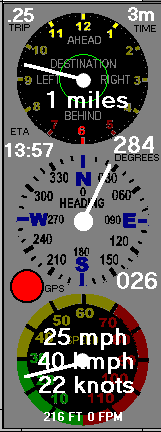
This is the Instrument Panel with dials now available to be switched
on or off with Version 4.8 of GPSS. The top dial shows graphically the
distance and direction to the destination. The circle gets bigger as you
get closer. The panel can be automatically switched to either side
to avoid hiding the car symbol, or it may be placed to one side of the
map on SVGA 800x600 displays. Controls are below the dials.
Version 4.8 introduced additional readouts:
- distance travelled tachometer. click it to reset. top left.
- time until reach destination at this speed. top right.
- Expected Time of Arrival at destination. Left.
- Direction to destination relative to heading. Right.
- GPS Signal lamp. Green if good. Red if bad. Left.
- Heading in degrees clockwise from north. Right.
The U key (Units) switches units of distance and speed:
- Miles, yards, miles per hour. Default on startup.
- Kilometres, metres, kilometres per hour. METRIC.CFG
- Nautical miles, yards, knots. NAUTICAL.CFG
Any file with name METRIC.CFG or NAUTICAL.CFG will effect startup units.